
How to check proxy speed?
04.12.2025
Everyone who uses a proxy—whether for working with websites, scraping, or privacy protection—knows the feeling when everything seems configured correctly, yet the internet “lags.” Slow page loading, interrupted streams, long API requests, or constantly dropping connections are not just inconveniences. For businesses, it’s a loss of time and money; for developers, missed deadlines; for regular users, frustration and the risk of losing access to essential services.
The Importance of Proxy Speed Testing: Why Checking Proxies Matters
- Invisible degradation. A proxy may technically work, but with high latency or low bandwidth, which harms UX and reduces the efficiency of automated tasks.
- Unpredictability. The same proxy may be blazing fast in the morning and overloaded in the evening—without regular tests, you won’t notice when it stops being suitable.
- Different tasks require different parameters. Streaming needs high download speeds and stability; gaming requires low latency; scraping depends on stable throughput and no timeouts.
- Security and policy issues. Providers or websites may intentionally or accidentally limit proxies, and this often looks like a “slow network.”
Parameters Affecting Proxy Speed
Proxy type
Free public proxies may seem attractive, but they’re usually overloaded and unstable: high latency, bandwidth spikes, many dead addresses, and the risk of data interception. Paid private proxies provide limited access and are managed by the provider, offering more predictable speeds, fewer downtimes, and support in case of issues.
IP Protocols
IPv4 is reliable and widely supported. IPv6 removes some overhead (such as NAT) and in some cases reduces latency, but it does not guarantee speed improvements—website and provider compatibility is still incomplete, so you should test your target resources before switching.
Connection protocols
HTTP, HTTPS, and SOCKS5 handle traffic and security differently, which affects speed. HTTP is simpler and may be faster for unencrypted requests; HTTPS adds TLS handshakes and CPU costs for encryption, increasing connection setup time; SOCKS5 forwards all traffic (TCP/UDP) and is flexible but does not encrypt data on its own. The stronger the encryption and the more handshakes, the higher the speed overhead.
Server geolocation
Physical distance is one of the main factors influencing latency. The closer the proxy is to you and to the target resource, the lower the ping and the more stable the connection. Even a powerful proxy on another continent will be noticeably slower than a local one.
Infrastructure and load
Performance depends on provider channels and configuration: bandwidth, number of simultaneous users, throttling, and load balancing. Under high load, speed “drops” and latency spikes are common.
Network metrics that matter
- Ping shows baseline latency;
- jitter reflects latency fluctuations;
- throughput indicates real bandwidth;
- connection setup time (TCP/TLS handshake) affects fast short requests;
- packet loss and weak DNS can also slow things down.
Different tasks require different metrics: games and interactive use require low ping; scraping and downloads need stable throughput.
Methods for Testing Proxy Speed
Online services
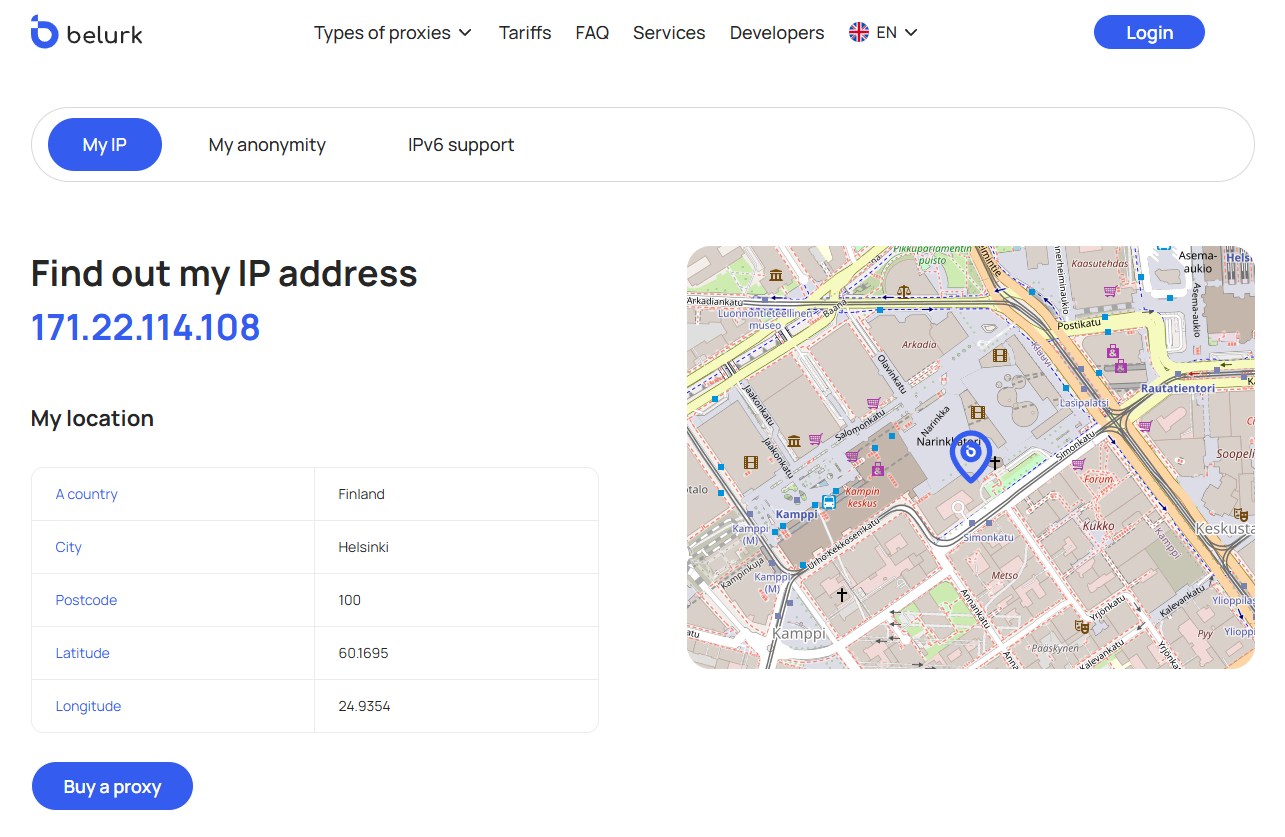
Websites like MyIP by Belurk quickly show which IP and country your traffic goes through, provide basic protocol information, and sometimes measure latency or response speed. Online checkers are useful for fast validation and determining geolocation/anonymity.
Specialized programs and services for bulk checking
These are utilities or SaaS solutions that test proxy lists in batches: validity, protocol, connection time, download speed, error rate, and country. They can simultaneously process many addresses, save results, and filter by metrics. Ideal for filtering or monitoring large numbers of proxies (scraping, bot proxy pools).
Testing in the browser
Open a site through the proxy and check Network/Timings in DevTools: DNS time, time_connect, TTFB (time to first byte), full page load, and resource sizes. This is the most practical way to evaluate real “user-experience” speed and compatibility with the site (e.g., script, image, and API request loading speeds).
Analyzing the Results
Run several tests at different times of day, because a proxy may be “fast” in the morning and slow in the evening. Compare results with and without the proxy to see the real performance loss. It’s better to look at the median of several runs rather than a single random result. If ping is low but speed is poor, there’s likely a bandwidth limit on the proxy. If ping is high and there’s packet loss, the physical route is long or the routing is poor. If there are many errors or CAPTCHAs, the site may be blocking the proxy.
What to do based on the results
- If latency is high — try proxies closer geographically.
- If throughput is low with normal ping — check provider bandwidth limits or switch proxies.
- If there are many errors/CAPTCHAs — change the proxy type or IP; reduce request frequency.
- If TLS handshake is slow — the proxy server may be weak (insufficient CPU) or the provider is under heavy load.
How to Choose the Best Proxies
Define your task. Do you need heavy scraping, social account management, low-latency gaming, streaming, regional content access, or simple anonymous browsing? Your task determines what matters most: low ping, high throughput, IP rotation, or anonymity level.
Check type and access. For reliable performance, private (paid) proxies are best—they’re less overloaded and offer stable speeds. Check whether the provider offers automatic IP rotation if you plan bulk requests or scraping.
Protocols and IP. Ensure the proxies support the protocols you need (HTTP/HTTPS, SOCKS5) and the required IP version (IPv4 or IPv6). IPv6 has advantages for some tasks, but not all services support it, so always test your target sites.
Geolocation and routes. Choose servers in the required region: the closer the proxy to you and the target resource, the lower the latency. For regional content, the country of location matters.
Speed and stability. Request test metrics: ping, TTFB, throughput, and error rate. Always run tests at different times of day.
Anonymity and log policy. If privacy is important, check the anonymity level and logging policy: whether requests or connection histories are stored. This matters for both security and compatibility with target websites.
Management and support. A control panel, API for mass checking/rotation, convenient authentication options, and responsive technical support save time and reduce friction. Reporting and proxy monitoring tools are also useful.
Price and scalability. Compare prices based on stability, number of simultaneous connections, and the ability to scale your proxy pool as your tasks grow.
Belurk is a provider of reliable private proxies tailored to various tasks: from scraping and social account management to video streaming and testing regional content. Belurk’s key advantage is its focus on practical value. The service delivers stable connections, easy integration, and tools for performance control. This makes our service equally convenient for beginners and professionals who need stability and speed.
Try belurk proxy right now
Buy proxies at competitive prices
Buy a proxy