

MTProto in Simple Terms: Features and Applications
01.06.2026
Telegram uses its own network protocol — MTProto. It handles sending messages, transferring files, and encryption. This article explains what MTProto is, why Telegram created it, and how an MTProto proxy differs from the protocol itself.
What is MTProto
MTProto is a network protocol that Telegram built from scratch in 2013. It works on top of TCP, IP, and UDP and is used for encrypting and transferring data between the messenger client and server.
The main tasks of MTProto:
- encrypting messages, files, and media;
- ensuring data integrity during transfer;
- authenticating clients on Telegram servers;
- supporting fast sync across multiple devices.
The protocol was created as an alternative to standard solutions like HTTPS or XMPP. The Telegram team wanted full control over the stack so they could add new features faster and manage security more flexibly.
How MTProto works
Technically, MTProto is a set of interconnected protocols:
- MTProto 2.0 — the current version, introduced after 2017. It fixed vulnerabilities in the first version.
- MTProto Mobile — a version for mobile devices with optimizations for poor networks.
- MTProto Cloud — the protocol for communicating with Telegram's cloud storage.
When sending a message, MTProto performs three main processing layers:
- Encryption layer (cryptographic). The original message is encrypted using a session key.
- Delivery confirmation layer. The client and server exchange confirmations to guarantee packet delivery.
- Transport layer. The packed data is sent over the network via TCP, HTTP, or UDP.
A key element is the session key, which is generated during the handshake phase and is used for only one session. If the connection is interrupted, the next session starts a new key. This makes traffic interception extremely difficult.
Why Telegram uses MTProto
MTProto is not the only protocol suitable for a messenger. But Telegram chose it for several reasons.
-
High speed. Standard protocols like HTTPS create unnecessary overhead. MTProto is designed to minimize the number of auxiliary packets and speed up transmission.
-
Traffic optimization. The protocol compresses data before sending. For text messages and small files, this noticeably saves traffic.
-
Data transmission security. MTProto uses symmetric encryption with session keys and separate keys for each operation. Even if one packet is decrypted, an attacker will not gain access to other messages. MTProto 2.0 is resistant to man-in-the-middle attacks when implemented correctly.
-
Support for different network conditions. MTProto adapts to delays and network switching (Wi-Fi, mobile internet). This is especially noticeable during calls and large file transfers.
What is an MTProto proxy
An MTProto proxy is a separate intermediary server that uses the same MTProto protocol. But unlike Telegram's main servers, it does not store messages or manage accounts. Its only job is to take your traffic and forward it to the messenger's real servers.
Key differences from regular SOCKS5/HTTP proxies:
- No login required. A single secret key (password) is enough to connect. No login is needed.
- Traffic is disguised as HTTPS. Externally, an MTProto proxy looks like an ordinary secure connection to a website. This makes it virtually indistinguishable to most traffic analysis systems.
- Works only with Telegram. You cannot send browser traffic through an MTProto proxy or use it with other applications. This is done intentionally to reduce the risk of abuse.
- Traffic inside the proxy is encrypted. Unlike SOCKS5, where the login and password may be sent in plain text, an MTProto proxy encrypts everything from the start.
Why use an MTProto proxy
An MTProto proxy has one function — to provide stable access to Telegram. Unlike SOCKS5, it is specifically tailored for messenger tasks and was created by the Telegram team itself.
- Stable access to Telegram. If a direct connection is unstable, the proxy offers an alternative route. The traffic itself remains encrypted, and your location stays hidden.
- Traffic masking. The MTProto proxy mimics ordinary HTTPS traffic. To external systems, it looks like a secure connection to a website.
- Operation in unstable networks. The proxy may be located in a country with a better connection to Telegram's servers. You connect to it, and it then sends the data to the main infrastructure.
How to set up an MTProto proxy in Telegram
Setup takes less than a minute. Telegram supports built-in MTProto proxy connections.
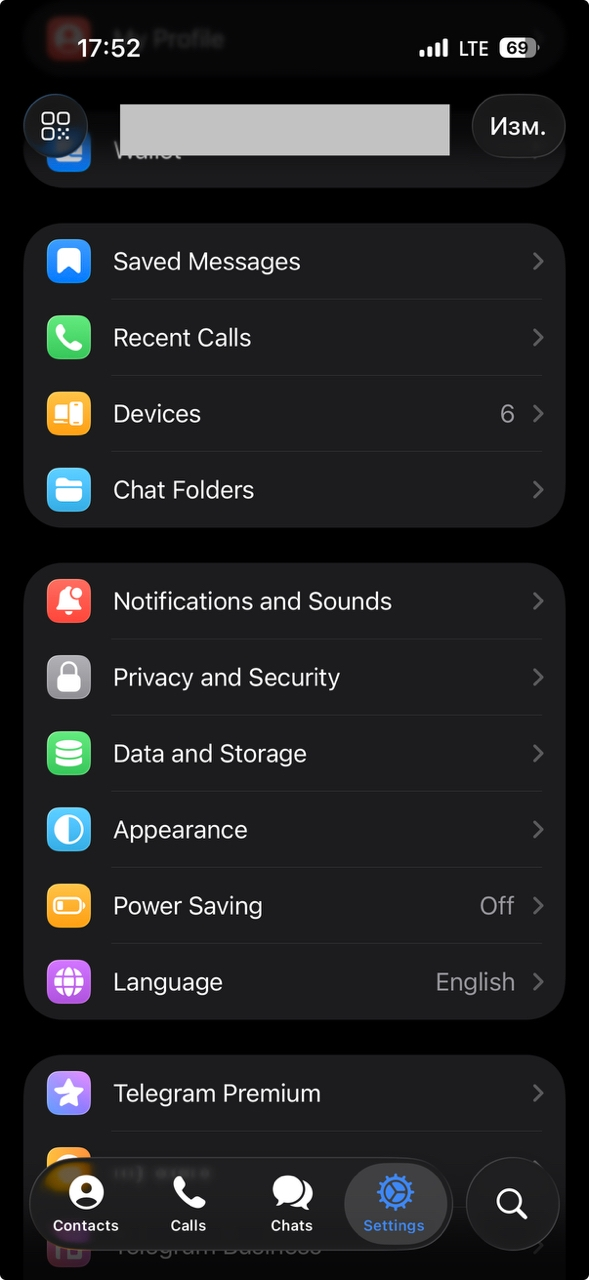
- Open Settings. Select "Data and Storage".
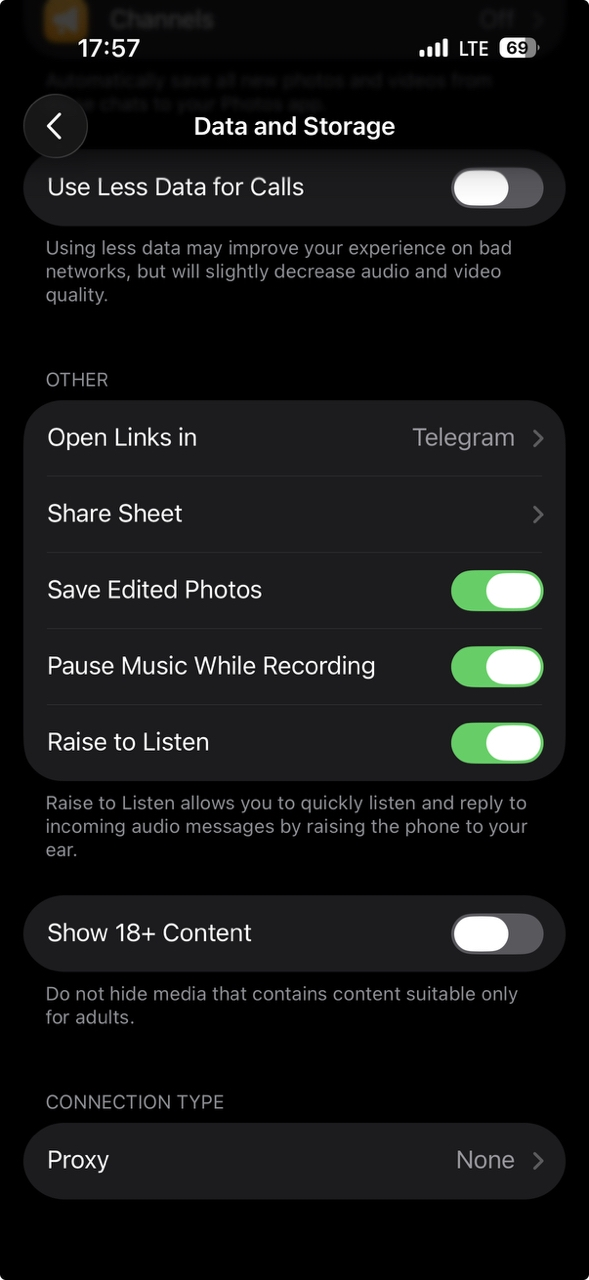
- Scroll down to "Proxy" and tap it.
- Select "Add Proxy".
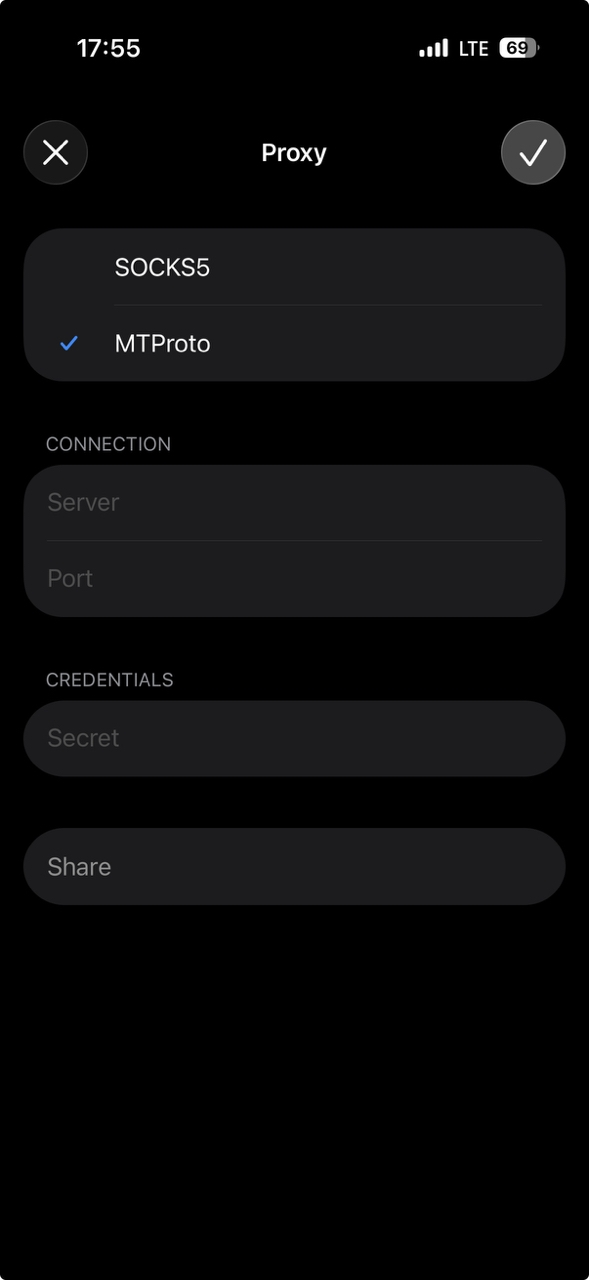
- In the "Type" field, select MTProto (in versions before 2023, this option might have been called "MTPROTO").
- Enter the server address, port, and secret key.
- Tap "Save" and turn on the "Use Proxy" switch.
If the data is correct, the status will change to "Connected". Telegram will automatically check if the proxy is working.
Where to get high-quality MTProto proxies
The quality of an MTProto proxy is determined by three parameters:
- Stability — the proxy should not drop the connection every 10–15 minutes.
- Speed — ping to Telegram's servers should not exceed 150–200 ms.
- Cleanliness — the IP address should not be on blacklists (otherwise Telegram may ignore it).
Free public proxies from open sources are often overloaded, unstable, or simply do not work. Their IP addresses may already be blocked.
Belurk provides MTProto proxies with proven characteristics: speed optimal for Telegram, quality support, clean IPs. Connection details are provided in a clear format. You can quickly set up the proxy in Telegram without spending time checking if it works.
Advantages of MTProto
A comparison with alternatives (SOCKS5, HTTP) shows several strengths of MTProto.
-
High speed. Since the protocol was created specifically for Telegram, it does not add unnecessary overhead. In tests conducted by users (TJ, 2018), an MTProto proxy on the same servers showed lower ping and more stable operation than SOCKS5.
-
Optimization for Telegram. An MTProto proxy "understands" the specifics of the messenger's protocol. It works more efficiently with long sessions and recovers better from connection breaks.
-
Effective operation in unstable networks. Thanks to built-in HTTPS masking, an MTProto proxy remains functional in networks where other proxy types are quickly detected.
Conclusion
In this article, we clarified the terms MTProto and MTProto proxy. The first is a protocol — the foundation of the entire messenger. The second is an auxiliary tool for connecting when a direct connection is inconvenient for some reason.
An MTProto proxy does not make Telegram faster — it simply offers another path for your data. If your current route is working poorly, the proxy may improve it. If the route is already fine, you will not see a difference.
The main advantages of an MTProto proxy are encryption, disguising itself as ordinary HTTPS traffic, and its narrow specialization for Telegram. It is not a universal tool, but it works effectively for its specific task.
When choosing an MTProto proxy, pay attention to stability, speed, and IP cleanliness. Free options often disappoint. Trusted services like Belurk guarantee that the proxy will not drop after half an hour and will operate at the stated speed.
Try belurk proxy right now
Buy proxies at competitive prices
Buy a proxy